Fetching run logs periodically for analysis
Use the monitoring endpoints to fetch run logs of a given period.The /executions/{runId}/logs endpoint returns a response based on log size:
- 200 (OK): Complete log retrieved in a single response.
- 206 (Partial Content): Log exceeds size limits; only the last 100,000 records are returned. The response includes the
X-Log-Next-Request-End-Timeheader for pagination.
For each response, use the POST method at /executions/{runId}/logs/status with the returned token to retrieve a presigned download URL. Each token is valid for one hour.
Before you begin
- Generate an access token:
- For users, generate a personal access token. For further information, see Generating a Personal Access Token.
- For service accounts, generate a service account token. For further information about how to generate a service account token, see Generating a service account token. Once generated, a service account token expires after 30 minutes. If it expires, generate a new token using the POST method at the endpoint
https://api.{env}.cloud.talend.com/security/oauth/token.
-
You must have the Author, Viewer, or Executor permission for the workspace to which the task to be monitored belongs.
-
You must know the ID of the task run you need to monitor.
This ID is available on the Task execution log page, reading as Task execution ID. Or you can obtain this ID via a
GETcall from the/processing/executables/tasks/{taskId}/executionsendpoint.
About this task
In this example, Talend API Tester is used to issue API requests. For further information about Talend API Tester, see Talend Cloud API Tester User Guide.
Procedure
Scenario 1: Generating and downloading small logs
Use this scenario when you expect a complete log to be returned in a single response (HTTP 200).
-
Open Talend API Tester in your browser and select POST from the Method list.
-
Enter the endpoint:
https://api.<your_environment>.cloud.talend.com/monitoring/executions/<runId>/logs -
Add the
startTimeandendTimequery parameters to define your log’s time range.Date format:
yyyy-mm-ddThh:mm:ssZ(for example,2021-09-01T07:01:45Z). -
Add an
Authorizationheader with the valueBearer <your_token>(separateBearerand the token with a single space). -
Verify that the run has completed, then wait 30 seconds before sending the API call to ensure log completeness.
-
Click Send to issue your request.
The response contains the log size and access token:
{
  "size": "number_of_log_lines",
  "token": "generated_token"
}
If the response status is 206 (Partial Content), follow Scenario 2 instead.
-
Create a new
POSTrequest. -
Enter the endpoint:
https://api.<your_environment>.cloud.talend.com/monitoring/executions/<runId>/logs/status -
In the Body field, enter the token from step 6.
Optionally, use the expression builder to dynamically retrieve the token from your saved request.
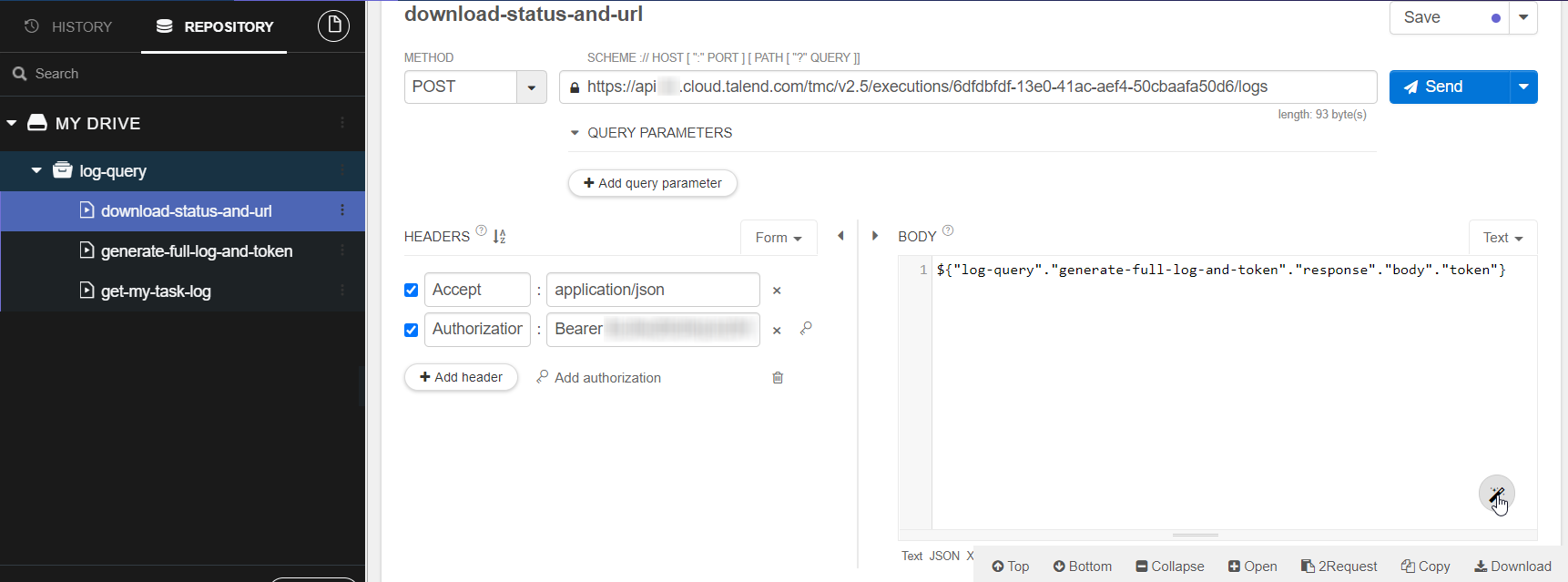
Example expression builder:
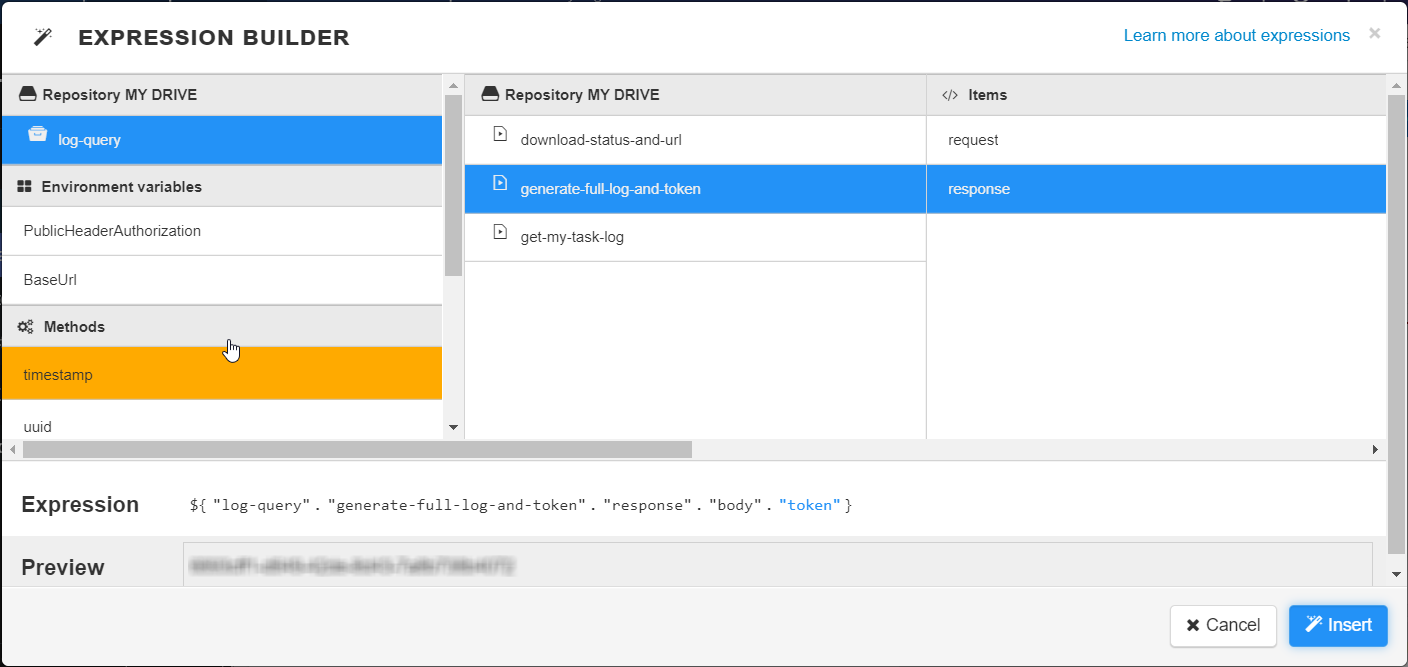
-
Click Send to issue your request.
The response contains a presigned download URL and status:
{
  "presignedURL": "https://s3_download_url",
  "status": "READY"
}
If the status is not
READY, retry this request until it showsREADY. -
Use the
presignedURLto download the complete log. The presigned URL expires after one hour.
Scenario 2: Downloading large logs with pagination
Use this scenario when the initial request returns HTTP 206 (Partial Content). You must iterate through multiple requests, calling the status endpoint for each chunk to generate a presigned URL and download it before requesting the next chunk.
-
Follow Scenario 1, steps 1–6 to issue the initial
/logsrequest.The response status is 206 and includes:
token: Use this token to retrieve the download URL for this log chunk.X-Log-Next-Request-End-Timeheader: Use this timestamp as theendTimefor the next request.
{ "size": "100000", "token": "token_for_chunk_1" } -
Create a
POSTrequest to retrieve the presigned download URL for this log chunk.Endpoint:
https://api.<your_environment>.cloud.talend.com/monitoring/executions/<runId>/logs/statusBody: Include the token from the 206 response.
-
Click Send. The response returns:
{ "presignedURL": "https://s3_temporary_download_url", "status": "READY" } -
Download the log chunk using the
presignedURL. The presigned URL expires after one hour. -
To retrieve the next log chunk, issue a new
/logsrequest:Endpoint:
https://api.<your_environment>.cloud.talend.com/monitoring/executions/<runId>/logsUpdate the
endTimequery parameter to the value from theX-Log-Next-Request-End-Timeheader of the previous response. -
Repeat steps 2–5:
- Call
/logs/statuswith the new token to get the presigned URL - Download the log chunk
- If the
/logsresponse status is 206: Continue to the next iteration with the newX-Log-Next-Request-End-Time - If the
/logsresponse status is 200: Download the final chunk and stop
- Call
-
Combine all downloaded log chunks in the order received to reconstruct the complete log.
Integrating into your monitoring system
You can integrate these API requests into your monitoring system to periodically fetch and analyze logs.
To analyze all runs of a task, retrieve the run IDs using this endpoint:
https://api.<your_environment>.cloud.talend.com/processing/executables/tasks/{taskId}/executions
Then pass each run ID to the /executions/{runId}/logs and /executions/{runId}/logs/status endpoints. For large logs, ensure you handle the 206 response pagination by following Scenario 2.
Hints: Automating the process
You can use Qlik Talend products to automate this workflow.
With API Tester: Design and validate a pagination cycle:
- Creating a scenario that sequences
/logsrequests and one/logs/statusrequest.- Use Using expressions to extract the
tokenfrom the response and pass it to the status endpoint.- Use Assertions values to validate that the response status code is either 200 or 206.
- Use expressions to extract the
X-Log-Next-Request-End-Timeheader for the next pagination cycle.With Talend Jobs: Use the validated pagination cycle in a Qlik Talend Job:
- Use tLoop to construct loops to repeat requests while status is 206
- Use tRESTClient and tJava to call the
/logsand/logs/statusendpoints, get the header fields, and seed the loop.- Extract response data (tokens, download link, log status) using tExtractJSONFields
- Download and store log chunks sequentially, then combine them after the loop exits